
Within any organization, certain people, whether they are part of the internal team or external contributors, need specific privileges to perform their tasks and missions within the IT system. It is incumbent upon companies to understand who they are, what privileges they need to accomplish their mission, and to master the management of access granted to them.
This process is all the more crucial because each authorization granted by administrators translates into a potential vulnerability for the company.
In an era when cyberattacks are multiplying with virulence, the efficient management of these privileged users is of critical importance for CIOs, CISOs, System Administrators…, managers, and decision-makers of an information system.
The privileged account vs. standard account
To define the notion of a privileged account, we must first understand what is not one.
Whether named a basic account, standard account, or non-privileged account, it grants a "typical" user simple access to all of a company's IT resources and software. Whether it is an internal file server, an intranet, or an application, the user holds an authorization level that grants them "standard" functionality without extended privileges.
For companies and organizations, it is important that this standard account is the norm. However, the privileged account remains the exception.
It is reserved for specific circumstances when privileged access authorizations are necessary for sensitive operations, such as the management of the company, its information system, or access to particular data. This differentiation ensures a balance between operational efficiency and security, by granting access to privileges only to those who have a legitimate and clearly defined need for it. Moreover, you can find an explanatory diagram of privileged accounts on our PROVE IT solution page.
Different types of privilegedaccess
Several types of privileged access can be distinguished based on their utility.
Named accounts:
A named account is a type of user account that is directly associated with a specific person within an organization. Unlike generic or shared accounts, which can be used by multiple people, a named account is individual and identifies a particular person as an authorized user. This type of account is often used for reasons of traceability, accountability, and security. It allows precise tracking of the actions and activities performed by this user on the information system, applications, or in data management.
These named accounts can have very varied uses:
"Super user" or "root" account :
This is an account that possesses extended and complete privileges on a computer system. This type of account has higher-level rights that allow it to access, modify, and control all system resources and functionalities, including critical system files and configurations. It allows, for example, to delete or add new standard or privileged accounts, depending on the arrival of new employees in an organization.
"Domain administrator" account :
This type of account holds extended privileges to manage and oversee a domain. These administrator accounts are responsible for complete domain management, including account creation, security, access authorizations, group policies, and network monitoring.
"Local administrator" account :
This type of user account possesses privileges to administer an individual computer or standalone system. This account has administrative privileges and allows the user to perform management and configuration tasks at the local level: settings, software and files, system settings, local user management, etc.
Business user :
HR, sales, marketing—many departments have access to sensitive data specific to their mission or position. These are therefore privileges related to access to specific resources: CRM, recruitment management tools, ERP, etc.
Shared accounts :
These are non-named accounts, often shared among multiple users for more technical purposes or business needs. Here are different types of accounts that are part of this category:
Administrative accounts :
These accounts are used by system administrators to manage and configure the information system. They have extended privileges to perform critical operations such as server configuration, user management, and information system security management.
Service accounts :
Service accounts are associated with specific applications or services within the information system. They are used to execute background processes, access databases, or interact with other services without requiring human intervention.
Shared application accounts :
Some applications may require shared accounts to be used by multiple users. These accounts are often used to provide common access to a specific application, such as project management databases or collaboration tools.
In summary, there are therefore named accounts to which we grant specific rights, and shared accounts also holding particular rights. It is therefore restrictive to speak of "privileged users"—we would rather speak of "privileged accounts," "privileged access," or "users with privileged access."
Internal administrators and external service providers
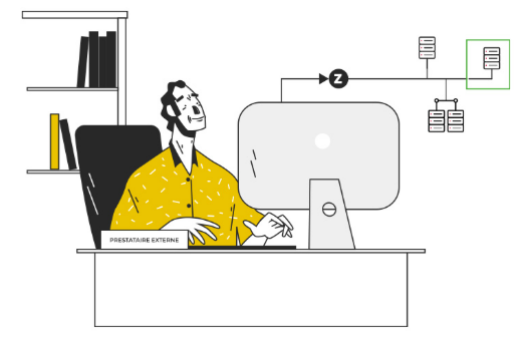
When addressing the question of monitoring activities performed by users with privileged access within their information system, two main categories stand out. On one hand, internal users, notably including administrators. On the other hand, external users, such as service providers and remote maintenance technicians, to name just this example.
The risks associated with privileged accounts, whether internal or external, share similarities and significant differences due to the nature of users and access.
For a comprehensive privilege management approach, these differences must be taken into account to minimize risks associated with each type of privileged account.

Discover our customers' success stories
They chose our PROVE IT bastion to strengthen their security measures and protect their essential resources against growing threats.
Ultimately, what is the management of these privileged accounts and access?
Granting your employees access to privileged accounts is not trivial, either because of the nature of the information in their possession or because of the actions that access gives them. It is therefore crucial for organizations to implement a policy for managing privileged accounts - Privileged Access Management.
1- Identify them
Implementing management of these sensitive access points means, first and foremost, identifying all of these accounts, their users, and the associated rights.
Each privileged access is an additional vulnerability for your company; having a policy to identify these access points is a first step in addressing these vulnerabilities.
2- Identify associated risks
The risks associated with implementing privileged accounts are multiple, but we can distinguish three commonly encountered types:
The incident:
Having extended administrative rights includes the possibility of making a handling error that could have serious consequences on your business. The unavailability of your services, whether externally or for your employees, can be critical but can also have significant financial repercussions.
Abuse and privilege escalation:
After compromising a privileged account, an attacker could seek to increase their privileges in order to access even more critical areas of the system, thus extending their control over the information system.
Authentication vulnerability:
An authentication vulnerability refers to a weakness or flaw in the mechanism for identifying and accessing a computer system or application. It allows an attacker to bypass or compromise the authentication procedures normally used to verify a user's identity and grant them appropriate access.
3- Implement a privileged access management policy
The constant evolution of cybersecurity news highlights the crucial importance of protecting privileged access. Faced with increasingly concrete risks posed by vulnerabilities in these special accounts, the need to secure them should no longer be considered a simple topic of debate. Recent security incidents and sophisticated cyberattacks clearly underscore that privileged accounts have become prime targets for attackers seeking to penetrate information systems of companies, local authorities, hospitals…
Securing privileged access is no longer an option but a fundamental requirement to preserve the integrity, confidentiality, and availability of IT systems.
This is achieved through the implementation of a privileged access management policy – PAM Privileged Access Management – within organizations:
- Attribution based on the principle of least privilege
- Identity management
- Secret vault (passwords, tokens, keys, etc.) and credential substitution
- MFA
- Traceability of actions performed
- Regular audits

Discover PROVE IT and all its features
Our solutionOther posts

PAM solution & bastion host : the essential safeguard for securing your privileged access
Publish on November 26, 2025

Passkeys : A new era for strong authentication
Publish on June 03, 2025
Active Directory : Microsoft's Complete Directory
Publish on October 28, 2024